
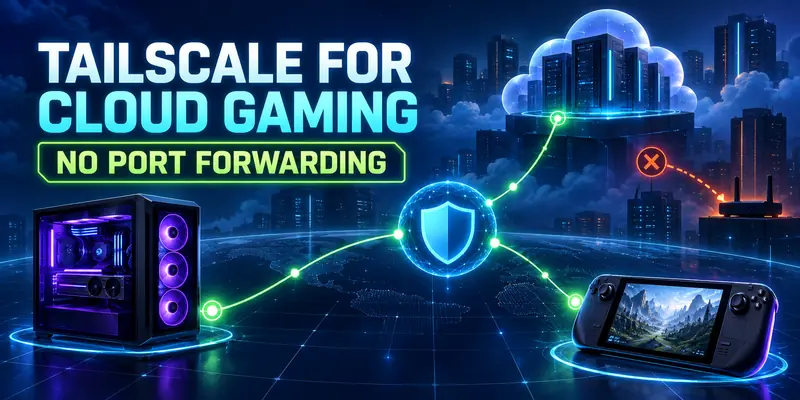
Tailscale Mesh VPN for Cloud Gaming gives remote players, streamers, and developers a private path to a gaming PC, cloud VM, or self-hosted server without exposing a game port on the public internet. The practical win is identity-based access and simpler routing. The important limitation: Tailscale can improve how you reach a host, but it cannot remove distance, ISP congestion, or the latency of a far-away cloud region.
Quick verdict
Tailscale is a strong port-forwarding alternative when both the gaming host and the player device can run Tailscale. It creates an encrypted tailnet, tries a direct peer-to-peer path first, and falls back to a relay when NAT or firewall conditions block direct connectivity. For a home gaming PC, direct node-to-node access is the cleanest design. For a LAN-only game server or device that cannot run Tailscale, add a narrowly scoped subnet router instead of exposing the whole home network.
- Best fit: remote access to a gaming PC, Sunshine/Moonlight streaming, private co-op servers, admin access, and small creator or developer labs.
- Main security benefit: you can authenticate devices and users, then permit only the required destination and port through Tailscale policy.
- Main performance caveat: a DERP-relayed path can add latency and reduce throughput, so always verify whether the session is direct before blaming the game or encoder.
Why replace port forwarding?
Traditional remote gaming often starts with a router rule: forward a public port to the gaming PC, configure the application, and hope the firewall, ISP, and changing home IP all cooperate. That design makes a service discoverable from the internet before you have decided exactly who should reach it. It also creates maintenance work when you change the host, move networks, or stop using the service.
A mesh VPN changes the access model. The host and client join the same private tailnet, and the client connects to the host’s Tailscale IP or MagicDNS name. The router does not need a game-specific inbound rule. Tailscale still uses normal outbound connectivity, NAT traversal, and its coordination system to find a path; it is not magic, and it is not a substitute for a firewall.
This is closer to zero-trust network access than a simple tunnel: access can be tied to an identity, device, tag, destination, protocol, and port. Tailscale’s current documentation recommends grants for new policy files, while legacy ACL syntax remains supported. Start with an explicit least-privilege policy because a newly created tailnet without an access policy may use a permissive default.
How Tailscale fits a cloud-gaming setup

Think of Tailscale as the private transport and the game or streaming application as the service. Tailscale does not render frames, encode video, host a GPU, or replace Sunshine, Moonlight, Steam Remote Play, Parsec, or a dedicated game server. It gives those applications a reachable private address and an access boundary.
Host node
Install Tailscale on the gaming PC, cloud VM, or game-server machine. Keep the application bound to the host firewall and expose only the application ports needed by approved clients.
Player or operator node
Install Tailscale on the laptop, handheld, desktop, or phone that will connect. Use the host’s 100.x Tailscale address or its MagicDNS machine name inside the client application.
For a practical baseline, pair this guide with 99GGCLOUD’s Sunshine and Moonlight setup guide. The streaming stack remains responsible for capture, encoding, decoding, controller input, and video quality; Tailscale handles private reachability.
Choose the right topology
| Scenario | Recommended path | Why it fits | Watch for |
|---|---|---|---|
| Gaming PC already supports Tailscale | Install Tailscale on host and client | Smallest attack surface and simplest troubleshooting | Both devices need an active Tailscale client |
| Dedicated server or console cannot run Tailscale | Use a subnet router on the same LAN | Advertises only the required private subnet to the tailnet | Route approval, OS forwarding, and local firewall rules |
| Cloud VM with a public IP | Install Tailscale on the VM and use provider firewall plus tailnet policy | Removes the need to expose the game service publicly | Cloud security groups and host firewall still matter |
| Friends or contractors need temporary access | Use a separate group or tag with narrow grants | Access can be revoked without changing router rules | Do not share an admin identity or broad exit-node access |
Use a direct node-to-node design whenever possible. A subnet router is useful for a legacy device, but it expands the routing responsibility: the router can become a bridge into the advertised LAN, so advertise the smallest CIDR that solves the problem.
Step-by-step setup
-
Define the private path
Write down the host, the client devices, the game or streaming service, and the exact ports required by that service. Do not begin with a whole-LAN route or an exit node. For a single gaming PC, the target is one node, not every device behind the router.
-
Install and authenticate Tailscale
Use the current platform-specific instructions in the official Tailscale installation guide. Sign the host and client into the intended tailnet. Rename machines clearly, such as
gaming-hostandstream-deck, so the admin console and policy file remain readable. -
Confirm that both nodes are visible
Open the Machines page and confirm that the host and client are online. With MagicDNS enabled, the host can be reached by machine name instead of copying an IP address. Keep the Tailscale IP available as a fallback when testing an application that does not resolve MagicDNS names correctly.
-
Apply least-privilege access
Use a grant or ACL that permits only the intended user or group to reach the host and the required TCP or UDP ports. Tailscale’s access-control documentation explains the policy model. For a personal lab, a small named group is easier to audit than a rule that allows every device in the tailnet.
-
Allow the application locally
On the host, permit the game server or streaming service through the operating-system firewall on the Tailscale interface. Keep the router’s inbound port forwarding disabled. If the application only listens on a specific LAN address, update its bind or listen setting according to its own documentation; do not disable the firewall globally just to make a connection work.
-
Connect using the private address
In the client application, enter the host’s Tailscale IP or MagicDNS name and the service port. For Sunshine/Moonlight, use the host node as the private discovery target; for a dedicated server, give players the private address only after they have joined the approved tailnet or shared access path.
-
Test the path before tuning video
Run
tailscale statuson a device with the CLI, then usetailscale ping gaming-hostto see whether the path is direct, peer-relayed, or DERP-relayed. Tailscale’s CLI reference documents these commands and their connection indicators. Record the result before changing bitrate, resolution, or encoder settings.
Optional: reach a device without installing Tailscale
For a legacy game server, NAS, or console on the same LAN, configure a Linux subnet router only when direct installation is impossible. Enable IP forwarding, advertise the smallest route with sudo tailscale set --advertise-routes=192.168.1.0/24, approve that route in the admin console, and add matching access rules. Follow Tailscale’s subnet-router documentation for the platform-specific forwarding and approval steps.
Policy and hardening for players and creators
Zero-trust is a configuration goal, not a label that makes every network safe automatically. Treat the tailnet policy as part of your gaming infrastructure.
- Group devices by role: gaming hosts, player devices, admin devices, and temporary guests.
- Permit only the host, protocol, and port needed for the game or streaming session.
- Keep administrative services such as SSH or remote desktop in a separate rule from game traffic.
- Use device tags carefully and review who can create or re-authenticate tagged nodes.
- Remove old devices, expired collaborators, and unused subnet routes from the tailnet.
- Do not use an exit node for a simple host-to-client gaming session; it changes internet egress and solves a different problem.
- Keep the cloud provider security group and the operating-system firewall restrictive even when Tailscale is installed.
If you share a server with friends, the cleanest pattern is a dedicated game-host node with a policy group for players. Avoid handing out a reusable admin login. Revoke the user’s tailnet membership or remove the group assignment when the session or project ends.
Latency and connection troubleshooting

Tailscale has three relevant connection types: direct, peer relay, and DERP relay. Direct paths normally offer the best throughput and lowest latency. A relay is still encrypted, but the extra hop can matter for interactive video and competitive play. The path can also change when you move networks, so a session that was smooth at home may behave differently on hotel Wi-Fi or a mobile hotspot.
If the path is DERP-relayed
- Run
tailscale ping host-nameand note the relay region and round-trip time. - Run
tailscale netcheckto inspect whether UDP is available. - Check whether a firewall, captive portal, hard NAT, or restrictive enterprise network blocks direct UDP.
- Test again from both ends; the NAT behavior of both networks affects the result.
If the path is direct but gaming still feels bad
- Measure the route to the actual cloud region or game server, not only the Tailscale peer.
- Check jitter, packet loss, bufferbloat, Wi-Fi interference, and upload saturation.
- Lower streaming bitrate or resolution only after confirming the network path.
- Separate input delay, encode/decode delay, and game-server tick behavior from network RTT.
Our Cloud Gaming Network Readiness Test can help structure a baseline, while the cloud-gaming latency guide explains why a single ping number is not a complete quality score. These are complementary checks, not proof that a Tailscale path will be direct on every ISP.
What Tailscale does not fix
Tailscale is not a shortcut around physics or a promise of lower ping. If your gaming PC is in another country, the path still covers that distance. If the client connection has heavy upload contention, the VPN cannot create capacity. If the cloud VM is in the wrong region, a private overlay does not move it closer to the player.
It also does not automatically solve application discovery. Some games assume a local broadcast, expose only a LAN server list, or require their own authentication and matchmaking. In those cases, connect by the host’s private address, use the application’s documented manual-add flow, or configure a subnet route only when the protocol genuinely needs access to a LAN device.
Editorial disclosure
This guide is based on current official Tailscale documentation checked on September 13, 2026. 9GG CLOUD did not run an independent cross-ISP latency benchmark for this draft, so no latency, packet-loss, relay-rate, or FPS figure is presented as a measured result. Real performance depends on region, NAT type, firewall policy, congestion, hardware, codec, and game workload.
FAQ
Does Tailscale eliminate port forwarding for cloud gaming?
Usually, yes, when both the host and client run Tailscale. The application is reached through the tailnet instead of a public router rule. You still need correct host-firewall and application settings, and a legacy device may require a subnet router.
Is Tailscale faster than a normal VPN?
It depends on the path. A direct Tailscale connection can avoid a central VPN server, while a DERP-relayed path adds an intermediary. Check the actual path with tailscale ping and compare jitter and packet loss under the same conditions.
Should I use an exit node for remote game streaming?
Not by default. An exit node routes a device’s internet traffic through another Tailscale device. A normal host-to-client tailnet connection is narrower and is usually the better starting point for private game access.
Can I expose a whole home network through Tailscale?
You can use a subnet router, but you should not advertise more of the LAN than necessary. Approve the route deliberately and write access rules for the required destinations and ports.
Bottom line
For most self-hosted cloud-gaming and remote-play setups, install Tailscale on the gaming host and player device first. Verify the connection type, apply a narrow grant, and connect through the Tailscale IP or MagicDNS name. That replaces a fragile public port with a private, identity-aware access path while keeping the real performance variables visible: distance, jitter, packet loss, encoder load, and route quality.